Exploring the Observations List
[Image 1: Image 1] (Image failed to download)
Exploring the Observations List
For CoMapeo Mobile v8
What is the Observations List
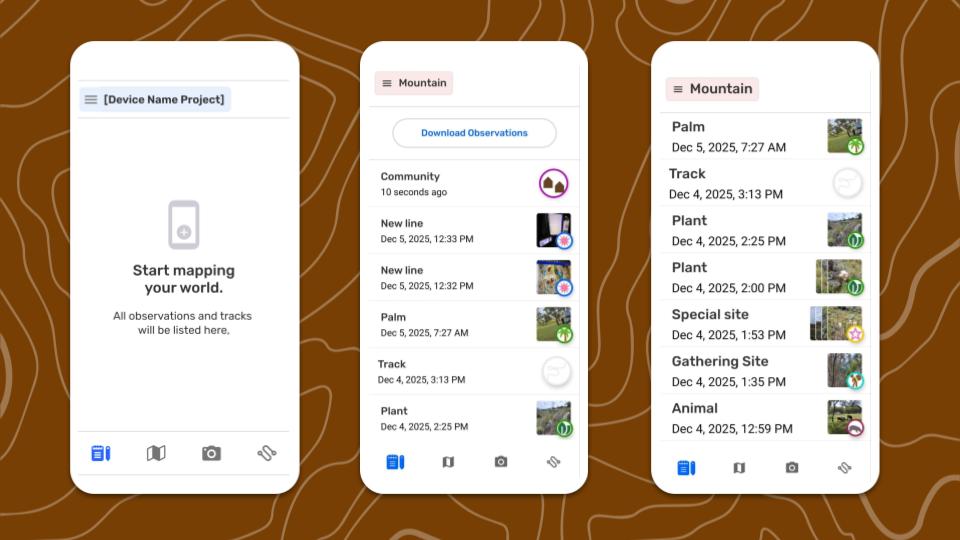
The  Observations List it the screen where all observations and tracks saved in a project can be viewed chronologically, with the newest first. This screen is helpful when searching for a specific observation with amongst many, especially in projects including observations and tracks received from collaborators. The observation list is an alternative to using the map screen to select observations to access information collected in a project.
💡 Tip: Access the Observation List any time from the main tabs on the bottom of the screen

Navigating the Observation List
This is the best place to review specific observations because category names, dates and times, and icons are visible at a glance.
Each item in the list provides a summary including:
- Category Name This is the predetermined label of a selected category.
- Timestamp Displayed as relative elapsed time for recent observations and with dates and times for observations taken on a different day.
- Category icon The icon displays at full size for tracks and observations without photos. This icon will display smaller when there are photo thumbnails.
- Photo thumbnail Any observations with photos will also include thumbnails of photos to help with visual references that are useful when scrolling through a large collection of gathered information.
- Exchange indicators In collaborative projects, all observation collected and exchanged appear in the same chronological list as a single collection of information in a specified project. Observations and tracks collected by other devices will have a blue indicator on the left margin.
Path to more features
The Observation List screen is the launching pad for important tools for common data processing workflows
Observation List
↳ Reviewing an observation
↳ Reviewing a track
↳ Download observations
Related Content
Go to 🔗 Reviewing an Observation
Go to 🔗 Exporting all Observations